Author Archives: Hugh E. Williams

Unknown's avatar

About Hugh E. Williams

Founder, Advisor, Professor, and Investor. Former Tech Exec.

Five tips for Writing a Presentation

I’ve had hundreds of chances to experiment with presentations, through teaching, invited talks, and day-to-day presentations at work. If there’s a mistake you can make in delivering a presentation, I’ve made it. Today, I’ll share with you the top five things I’ve learnt along the way — hopefully, they’ll help you write a great talk!

One major point

You’ve been asked to give a presentation that’s less than an hour in length. My advice: deliver one major theme or point to the audience – you want them to leave unambiguously ready to understand, believe, act, or follow the point you’ve made.

Don’t share two or more major points. The audience will leave with different key takeaways. Or, worse still, you’ll confuse the audience or seem rushed in your delivery. And you usually won’t land that key message that you want the audience to act on or evangelize for you.

What is a major point or theme? It depends on the length of the talk. If I was speaking for an hour, I’d design a talk that lands a broader theme than if I was speaking for fifteen minutes. For example, in an hour I might land “how to deliver a great presentation”. If I was speaking for fifteen minutes, I might land “tips for verbal presentations”.

What if you have to speak on two topics in one session? For example, your boss wants you to present to her boss on two topics next week. Write two talks: start and finish the first, change decks, and start and finish the second. Consider having question time between the two. Pretend you’re two different speakers coming up to the podium.

One slide every two minutes

Rule of thumb: one slide for every two minutes of presentation. A one hour talk, thirty slides maximum. A fifteen minute presentation, seven slides. Really.

If you fly through slides, you’ll seem rushed. If you stay on one slide, you’ll kill the audience with boredom.

If I’m speaking for an hour, I restrict myself to thirty slides maximum — I’m always tempted to have more, and every time I do I regret it. If anything, err on the side of caution: I’ve given a few one hour talks with twenty or fewer slides, and it’s worked out fine.

Keep the slides simple

A slide with the right amount of content

A slide with close to the maximum amount of content. I’ve delivered this one a few times, and it’s hard to get through it in two minutes.

I like to have four to six lines of text on a PowerPoint slide. I try to avoid sub-bullets. I definitely wouldn’t have more than eight lines of text; I know when I reach eight that I’ve got two slides of content.

I dislike quadrant slides, they’re too complex for a presentation. I dislike two-content slides too — the ones that have text on the left and an image on the right (or vice-versa). If I want to include an image, I typically make it the feature of the slide and accompany it with at most two lines of text above or below the image.

Signpost the structure

I include the following signposts in most talks I deliver:

  • A title slide, with talk title, my name, company, and contact information

    An example title slide with talk title, my name, company  and contact information

    An example title slide with talk title, my name, company and contact information

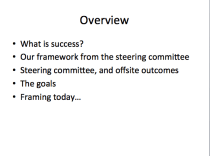
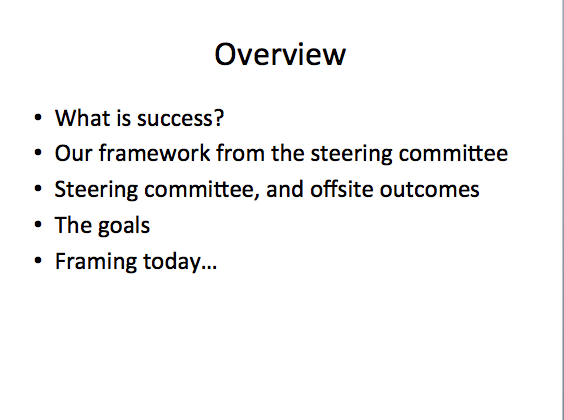
  • An overview slide that explains the structure of the talk to the audience; that way, they know what to expect, it helps them to know when to ask questions and what’s going to be explained

    An overview slide. Usually the second slide in my presentations, and there to outline the structure of the talk

    An overview slide. Usually the second slide in my presentations, and there to outline the structure of the talk

  • An occasional subsection slide that shows we’ve arrived at a major section in the talk

    A subsection slide that explains where we are in the talk structure. I'll typically include two or three of these in a longer talk, and they'll reference back to the overview slide

    A subsection slide that explains where we are in the talk structure. I’ll typically include two or three of these in a longer talk, and they’ll reference back to the overview slide

  • (Sometimes) A concluding slide that contains the key points from the presentation
  • A subsection slide that includes the phrase “Questions?” or “Q&A?”

    A final slide asking for questions (and doing a little advertising)

    A final slide asking for questions (and doing a little advertising)

I count these slides in my “two minutes per slide” rule; these don’t come as free extras.

Be careful with the colors, design, transitions, and builds

When you’ve got Microsoft’s Powerpoint as your tool (or something fancy such as prezi), it’s tempting to include lots of slide builds, transitions, zooming, and animation. Resist. These are very often a distraction — and can lead to your audience thinking you’re more about style than substance.

I particularly dislike builds. Why? Because it looks like you’re hiding something, and it doesn’t give the audience the chance to read, understand, and put what you’re saying in context.

Afterword

I was fortunate to work with Justin Zobel for many years, and developed my early presentation style with his coaching. His book is worth the money — highly recommended for anyone who needs to write and present in the field of IT or computer science.

See you next week.

Changing platforms at Scale: Lessons from eBay

At eBay, we’ve been on a journey to modernize our platforms, and rebuild old, crufty systems as modern, flexible ones.

In 2011, Sri Shivananda, Mark Carges, and I decided to modernize our front-end development stack. We were building our web applications in v4, an entirely home-grown framework. It wasn’t intuitive to new engineers who joined eBay, they were familiar with industry standards we didn’t use, and we’d also built very tightly coupled balls of spaghetti code over many years. (That’s not a criticism of our engineers – every system gets crufty and unwieldy eventually; software has an effective timespan and then it needs to be replaced.)

Sri Shivananda, eBay Marketplaces' VP of Platform and Intrastructure

Sri Shivananda, eBay Marketplaces’ VP of Platform and Intrastructure

We set design goals for our new Raptor framework, including that we wanted to do a better job separating presentation from business logic. We also wanted better tools for engineers, faster code build times, better monitoring and alerting when problems occur, the ability to test changes without restarting our web servers, and a framework that was intuitive to engineers who joined from other companies. It was an ambitious project, and one that Sri’s lead as a successful revolution in the Marketplaces business. We now build software much faster than ever before, and we’ve rewritten major parts of the front-end systems. (And we’ve open sourced part of the framework.)

That’s the context, but what this post is really about is how you execute a change in platforms in a large company with complex software systems.

The “Steel Thread” Model

Mark Carges, eBay's Chief Technical Officer

Mark Carges, eBay’s Chief Technical Officer

Our CTO, Mark Carges, advocates building a “steel thread” use case when we rethink platforms. What he means is that when you build a new platform, build it at the same time as a single use case on top of the platform. That is, build a system with the platform, like a steel thread running end-to-end through everything we do.

A good platform team thinks broadly about all systems that’ll be built on the platform, and designs for the present and the future. The risk is they’ll build the whole thing – including features that no one ultimately needs for use cases that are three years away. Things change fast in this world. Large platform projects can go down very deep holes, and sometimes never come out.

The wisdom of the “steel thread” model is that the platform team still does the thinking, but it’s pushed by an application team to only fully design and build that parts that are immediately needed. The tension forces prioritization, tradeoffs, and a pragmatism in the platform team. Once you’re done with the first use case, you can move onto subsequent ones and build more of the platform.

Rebuilding the Search Results Page

Our first steel thread use case on Raptor was the eBay Marketplaces Search Results Page (the SRP). We picked this use case because it was hard: it’s our second-most trafficked page, and one of our most complex; building the SRP on Raptor would exercise the new platform extensively.

We co-located our new Raptor platform team – which was a small team by design – together with one of our most mission critical teams, the search frontend team. We declared that their success was mutually dependent: we’re not celebrating until the SRP is built on Raptor.

We asked the team to rebuild the SRP together. We asked for an aggressive timeline. We set bold goals. But there was one twist: build the same functionality and look-and-feel as the existing SRP. That is, we asked the team to only change one variable: change the platform. We asked them not to change an important second variable: the functionality of the site.

This turned out to be important. The end result – after much hard work – was a shiny new SRP code base:  modular, cleaner, simpler, and built on a modern platform.  But it looked and behaved the same as the old one. This allowed us to test one thing: is it equivalent for our customers to the old one?

Testing the new Search Results Page

We ran a few weeks of A/B tests, where we showed different customer populations the old and new search results page. Remember, they’re pretty much the same SRPs from the customers’ perspective. What we were looking for were subtle problems: was the new experience slower for some scenarios than the old one? Did it break in certain browsers on some platforms? Was it as reliable? Could we operate it as effectively? We could compare the populations and spot the differences reasonably easily.

This was a substantial change in our platforms and systems, and the answer wasn’t always perfect. We took the new SRP out of service a few times, fixed bugs, and put it back in. Ultimately, we deemed it a fine replacement in North America, and turned it on for all our customers in North America. The next few months saw us repeat the process across our other major markets (where there are subtle differences between our SRPs).

What’s important is that we didn’t change the look and feel or functionality at first: if we’d done that, we may not have seen several of the small problems we did see as fast as we saw them.

Keeping the old application

Another wise choice was we didn’t follow that old adage of “out with the old, and in with the new”. We kept the old SRP around running in our data centers for a few months, even though it wasn’t in service.

This gave us a fallback plan: when you make major changes, it’s never going to be entirely plain sailing. We knew that the new SRP would have problems, and that we’d want to take it out of service. When we did, we could put the old one back in service while we fixed the problem.

Eventually, we reached the confidence with our new SRP that we didn’t need the old one. And so it was retired, and the hardware put to other uses. That was over a year ago – it has been smooth sailing since.

The curse of dual-development

You might ask why we set bold goals and pushed the teams hard to build the new Raptor platform and the SRP. We like to do that at eBay, but there’s also a pragmatic reason: while there’s two SRP code bases, there’s twice the engineering going on.

Imagine that we’ve got a new idea for an improvement to the SRP. While we’re building the new SRP, the team has to add that idea to the new code base.  The team also has to get the idea into the old code base too – both so we can get it out to our customers, and so that we can carry out that careful testing I described earlier.

To prevent dual development slowing down our project, we declared a moratorium on features in the SRP for a couple of months. This was tough on the broader team – lots of folks want features from the search team, and we delayed all requests. The benefit was we could move much faster in building the new SRP, and getting it out to customers. Of course, a moratorium can’t go on for too long.

And then we changed the page

After we were done with the rollout, the SRP application team could move with speed on modernizing the functionality and look-and-feel of the search results page.

Ultimately, this became an important part of eBay 2.0, a  refresh of the site that we launched in 2012. And they’re now set up to move faster whenever they need to: we are testing more new ideas that improve the customer experience than we’ve been able to before, and that’s key to the continued technology-driven revolution at eBay.

See you next week.

Five Myths about Hash Tables

A hash table is data structure that is used to search for exact matches to a search key. For searching, they work like this:

  1. Take a search key (example: the word “cat”)
  2. Hash the search key: pass the key to a function that returns an integer value (example: the hash function returns 47 when the input key is “cat”)
  3. Use the integer value to inspect a slot to see if it contains the search key (example: look in an array at element 47)
  4. If the key matches, great, you’ve found what you’re looking for and you can retrieve whatever metadata you’re looking for (example: in array element 47, we’re found the word “cat”. We retrieve metadata that tells us “cat” is an “animal”)
  5. If the key doesn’t match and the slot contains something besides the key, carry out a secondary search process to make sure the search key really isn’t stored in the hash table; the secondary search process varies depending on the type of hashing algorithm used (example: in array element 47, we found the word “dog”. So, let’s look in slot 48 and see if “cat” is there. Slot 48 is empty, so “cat” isn’t in the hash table. This is called linear probing, it’s one kind of secondary search)

I had a minor obsession with hash tables for ten years.

The worst case is terrible

Engineers irrationally avoid hash tables because of the worst-case O(n) search time. In practice, that means they’re worried that everything they search for will hash to the same value; for example, imagine hashing every word in the English dictionary, and the hash function always returning 47. Put differently, if the hash function doesn’t do a good job of randomly distributing search keys throughout the hash table, the searching will become scanning instead.

This doesn’t happen in practice. At least, it won’t happen if you make a reasonable attempt to design a hash function using some knowledge of the search keys. Indeed, hashing is usually in the average case much closer to O(1). In practice, that means almost always you’ll find what you’re looking for on the first search attempt (and you will do very little secondary searching).

Hash tables become full, and bad things happen

The story goes like this: you’ve created a hash table with one million slots. Let’s say it’s an array. What happens when you try and insert the 1,000,001st item? Bad things: your hash function points you to a slot, it’s full, so you look in another slot, it’s full, and this never ends — you’re stuck in an infinite loop. The function never returns, CPU goes through the roof, your server stops responding, and you take down the whole of _LARGE_INTERNET_COMPANY.

This shouldn’t happen if you’ve spent time on design.

Here’s one solve: there’s a class of hash tables that deal with becoming full. They work like this: when the table becomes x% full, you create a new hash table that is (say) double the size, and move all the data into the new hash table by rehashing all of the elements that are stored in it. The downside is you have to rehash all the values, which is an O(n) [aka linear, scanning, time consuming] process.

Here’s another solve: instead of storing the metadata in the array, make your array elements pointers to a linked list of nodes that contain the metadata. That way, your hash table can never get full. You search for an element, and then traverse the linked list looking for a match; traversing the linked list is your secondary hash function. Here’s a diagram that shows a so-called chained hash table:

A chained hash table, showing “John Smith” and “Sandra Dee” both in slot 152 of the hash table. You can see that they’re chained together in a linked list. Taken from Wikipedia, http://en.wikipedia.org/wiki/Hash_table

Chained hash tables are a very good idea. Problem solved.

By the way, I recommend you create a hash table that’s about twice the size of the number of elements you expect to put into the table. So, suppose you’re planning on putting one million items in the table, go ahead and create a table with two million slots.

Trees are better

In general, trees aren’t faster for searching for exact matches. They’re slower, and here’s peer-reviewed evidence that compares B-trees, splay trees, and hashing for a variety of string types. So, why use a tree at all? Trees are good for inexact matches — say finding all names that begin with “B” — and that’s a task that hash tables can’t do.

Hash functions are slow

I’ve just pointed you to research that shows that must not be true. But there is something to watch out for: don’t use the traditional modulo based hash function you’ll find in your algorithms text book; for example, here’s Sedgewick’s version, note the “% M” modulo operation that’s performed once per character in the input string. The modulo is used to ensure that the hash value falls within the size of the hash table — for example, if we have 100 slots and the hash function returns 147, the modulo turns that into 47. Instead, do the modulo once, just before you return from the hash function.

Here’s the hash function I used in much of my research on hashing. You can download the code here.

A very fast hash function written in C. This uses bit shifts, and a single modulo at the end of the function. If you find a faster one, would love to hear about it.

Hash tables use too much memory

Again, not true. The same peer-reviewed evidence shows that a hash table uses about the same memory as an efficiently implemented tree structure. Remember that if you’re creating an array for a chained hash table, you’re just creating an array of pointers — you don’t really start using significant space until you’re inserting nodes into the linked lists that are chained from the hash table (and those nodes typically take less space than nodes in a tree, since they only have one pointer).

One Small Trick

If you want your hash tables to really fly for searching, move any node that matches your search to the front of the chained list that it’s in. Here’s more peer-reviewed evidence that shows this works great.

Alright. Viva Hash Tables! See you next time.

Your action plan: using feedback to drive your career

I recently published this blog post on seeking career feedback. Once you’ve sought feedback, it’s time to make choices about what you’re going to do, share the plan with your manager, and gauge your progress as you work on it.

The negatives

If you’ve asked for feedback, listened, and recorded it, you’re ready to start creating an action plan. You now need to decide on the importance of each constructive piece of feedback. Here are some things to consider:

  • How many times did you hear it? The more times, the more important
  • Who did you hear it from? Worry more about your boss’s opinion than your peers’, and more about your peers’ than anyone else’s
  • When did they say it? The second thing is often the most important – people warm up with a gentle message, and often end later with low priority points
  • Is it a perception or a reality? Did you have an off-day, or an off-interaction that was out of character? Or is this a genuine flaw?
  • Do you think it is correct? Was it on your list?

I recommend finding the top five pieces of feedback, and sorting them from most- to least-important by considering the criteria above. You don’t want to work on too many things at once.

The positives

Don’t take positive feedback for granted. You can use the same techniques as you’ve used for the negatives to create your list of top strengths. Make sure you do this too: figure out your top five strengths.

Creating a Plan

You have a fundamental choice in creating a plan. You can decide to lean hard on your strengths and have them propel you further forward, or you can choose to work on the weaknesses so they don’t hold you back. The right thing to do is usually somewhere in between: focus on improving a couple of weaknesses at any one time, and work on using your strengths to their maximum potential.

One thing I’ve observed is that senior people are usually held back by their weaknesses. In part it’s the Peter Principle, and in part it’s the fact that everyone around them is pretty awesome, and flaws stand out. There’s definitely a point I often see where people get confused – they expect to advance  in their career because of the awesome competencies they have, and then suddenly they’re stuck because of their weaknesses. It often takes people a while to accept that a few things need to change, especially if they’ve never heard negative feedback before.

I’d recommend taking your top two or three negatives, and your top one or two strengths, and writing them down as the areas you want to focus on. Bonus points if you sort them into priority order. Now, you need an action plan. Next to each point, write key steps you’ll take to address that weakness, or showcase that strength. The more actionable, the better – it’s not that helpful to say “you’ll improve your public speaking”, it’s helpful to say “give three public talks in 2012, and seek actionable feedback immediately after each presentation”.  Try and use quantities, dates, names, situations, or other concrete points in creating the plan. Remember that taking action on weaknesses takes you out of your comfort zone – so the steps should feel hard, awkward, and uncertain.

Executing the plan

If you’ve got an actionable plan, I’d recommend reviewing it with your boss. At the very least, you’re going to look good for having taken career development seriously. You’ll probably also get great feedback on whether this is a good plan or not – and, again, your boss’s opinion matters.

Now you can go execute your plan. Good luck. Keep an eye on your progress: I’d recommend giving yourself a green, yellow, or red rating on each point every six weeks or so. Ask the people who gave you’re the feedback points whether they’re seeing a change – the door is open with them, and you should use it.

Of course, this is a process that never ends. You can complete the plan successfully, and there’ll be another plan ready to be created by starting over. Good luck, I hope you use feedback successfully in building your career.

Knowing Your Customer with Data

Are you really data driven? Here’s what I’ve learnt about making decisions using quantitative data.

A Typical Test versus Control Experiment

Let’s get on a page about what we’re discussing. Most web companies run test versus control experiments, or A/B tests. The idea is simple:

  1. Divide the customers into populations
  2. Show one population the control (default, “A”) experience
  3. Show one or more populations the test (new, altered, “B”) experience
  4. Collect data from each population
  5. Compute metrics from the data
  6. Understand the relative results between the test and the control
  7. Make decisions: either keep the control, or replace it with a new, better experience from a positive test

Explaining how to really know your customer with data at the 2012 eBay Data Conference

It’s critical in Step 5 to compute confidence intervals, that is, statistical measures that tell you the probability that the phenomena you’re seeing is real. For example, using a one-sided t-test, you might learn that there’s a 90% probability that the test experience is better than the control.

Let’s suppose you’ve reorganized the layout of your site, and what you’ve learnt is that customers abandon the pages much less. Through your test, you’re 90% confident that a new experience you’ve tested is better than the default, control experience. On that basis, you might want to launch the new, test experience — but I’d caution you to learn more before you make a decision.

Where does the behavior come from?

I recommend you always dig deep into your data. Learn as much as you can before you decide. I like to see data “cut” (broken into sub populations) by:

  • Device (Mobile vs. tablet vs. desktop. Break it down by brand, make, and model [for example, Apple iPad HD])
  • Operating system (Linux vs. Mac OS X vs. Windows, break it out by versions)
  • Browser (Chrome vs. IE vs. Firefox vs. Safari, break it out by version)
  • Channel (Visits from within your site vs. visits from Google search vs. Visits from paid advertising)

When you do this, and add in your confidence intervals, you will almost always learn something. Is the new experience working as expected on the dreaded IE6 and IE7? Any issues on a mobile device? Does it work better when customers are navigating within your site versus landing in the middle of it from a Google search?

Ask yourself: what can I improve before I make a decision? And always ask: knowing this detail, am I still comfortable with my decision? Be very careful about launching new experiences that help most of the population, and hurt some of it — ask whether you can live with the worst case experience.

When you do these cuts, make sure the data makes sense. I’ve learnt over the years that when you see something that you don’t expect, it’s almost always a bug, or an error in the data. Never explain away surprises with complex theories — something is probably broken.

Who or what is affected by the change?

You can think of the previous section as suggesting you cut the data funnel — where the behaviors come from. You should also cut the data by who or what it affects on your site:

  • Which customers are affected? (Old versus new, first time visitors versus returning, regular versus occasional, international versus domestic, near versus far, and so on)
  • What categories are affected? (Fashion versus electronics, browse versus buy, and so on)
  • Which queries are affected? (A search-centric view. Long versus short queries, English versus non-English, Navigational versus Informational, and so on)
  • Which sessions are affected? (Long research sessions versus short purchase sessions, multi-query sessions versus single-query sessions, multi-click sessions versus single-click sessions, and so on)
  • Which pages are affected?

All the same caveats and suggestions from the previous section apply here.

I also love to compute many different metrics. While you’ll often have a “north star” metric that you’re trying to move — whether it’s relevance of the experience, abandonment of your site, or the dollar value of goods sold — it’s great to have supporting data to inform your decision. When you compute more metrics, you almost always will see contradiction that makes your decisions harder: but it’s always better to know more than to have your head in the sand. It takes smart, sensible debate to make most launch decisions.

The mean average hides the truth

Here’s an over-simplified example. Suppose six customers rate your site on a scale of 1 (horrible) to 10 (amazing). In the control, they rate you as 4, 5, and 6. In the test, they rate you as 1, 4,  and 10. The control and test have a mean average rating of 5. (Ignore the statistical significance for the simple example.)

On this basis, you might abandon the work on the new experience — it’s no better than the control. But if you dig in the data, you’d see that some customers love the new experience, and some hate it. Imagine if you can fix whatever is causing customers to hate it — if you could get that 1 to be a 5, you’d see a mean average of over 6 for the test. The fastest way to move a mean is to fix the outliers: focusing on what’s broken.

I don’t like mean averages because they hide the interesting nuggets. I like to see 90th and 95th percentiles — show me the performance of the best and worst 10% or 5% of customer experiences respectively. In our simple example, I’d love to know that the worst customer experience was 1 in the test and 4 in the control, and the best experience was 10 and 6. Knowing this, I’m, excited about the potential of the test, but worried that something is very wrong about it for some customers. That guides me where to put my energy.

Don’t be myopic

It’s common to measure your feature in the product, and ignore the ecosystem. For example, you might be working on an improvement on some part of a page — imagine that you’re working on Facebook’s news feed. You’ve figured out an improvement, run the test, seen much better customer engagement, and you’re excited to launch.

But did you worry about what you’ve done to the sponsored links on the right side of the page? Did you hurt the performance of another part of the product owned by another team? It’s common for features to hurt performance of others, and often cause the overall result to be neutral. This happens between features on one page, and between pages. Make sure you always measure overall page and site performance too.

Tests don’t tell you everything

Tests don’t tell you what you don’t measure. Measure as much as you can.

Even if you do measure as much as you can, there’ll be much happening outside your test that’s important. For example, if you run a test for a week, you don’t learn anything about the long term effects on customer retention. You don’t know anything about how customers will adapt to using the feature. You won’t know whether the effects are seasonal, or what might happen if some of your assumptions change — for example, what if another team changes something else on the page or site in the future?

This can be ok. Just realize the limitations, and be aware that retesting in the future might be a smart choice.

Quantitative testing also won’t tell you anything qualitative about what you’re working on. That’s a whole another theme of testing — and one I do plan to come back to talk about in the future.

Afterword

Around 1,000 people attended the employee-only eBay Data Conference recently. I had the opportunity to speak to them through my opening keynote address, and this post is based on that presentation. Thanks to Bob Page for inviting me.

Explaining Baseball to a Cricketer

I grew up watching and playing cricket. I’ve since fallen in love with baseball. They’re similar games: baseball was born from cricket. They both have subtlety, subplots, the ebb and flow of a long game. The games often contain something you’ve never seen before. I couldn’t find an interesting explanation of baseball for those who understand cricket — though I offer no promises of wikipedia’s (dull) comprehensiveness. This’ll be the first of two posts.

Getting out

You’ve read this far, so you must know some basics. There’s nine innings, each team bats in each inning, three outs and you change teams. When you’re out 27 times, it’s all over (unless it’s a draw – more on that later).

You can get out lots of different ways, just like cricket. The common ones are being caught, struck out, forced out, and tagged out. There’s also obscure ones – both cricket and baseball share rules around how long you have before you’re out for not batting in a timely fashion.

Australia playing the Seattle Mariners in 2009 in Peoria, Arizona. Australia was warming up for the World Baseball Classic, and the Mariners had just begun their Spring Training for the long season ahead. Australia won 11-9. The first game for Ken Griffey Jr with the Mariners in his second, unsuccessful stint with the team.

You get a strike against you as a batter when you swing the bat and miss, the ball passes through the strike zone without you hitting it, or you foul it off by hitting it outside the field of play (behind the lines that are on each side of the field, often marked at the ends by large yellow foul poles). You strike out when you do any of these three times – except you can’t get a third strike on a foul. Striking out is analogous to being bowled.

You get a free pass walk to first base if you’re hit by the ball (rather different to cricket). You also get a walk if you receive four pitches (so-called balls) that aren’t in the strike zone, and that you didn’t swing at. The strike zone is subtle: in the way LBW is subtle. It’s roughly knee height to just below the writing on the jersey, and roughly as wide as the home plate that sits on the ground.

You’re forced out when you have to advance to the next base, but you don’t make it. You must advance when you hit the ball into play (it always tippity run), or when you’re on a base and there’s a batter behind you who’s advancing to the base you’re on. Force outs typically happen by a fielder standing on the base you’re headed to and having the ball in their possession. It’s just like a keeper knocking the bails off in a run out, except it’s a run out where you were forced to run.

You’re tagged out when you’re touched by a fielder who’s holding the ball and you’re not safely on a base. This usually happens when you’ve decided to run to the next base when you weren’t forced to. This is a bit subtle: as a spectator, you have to know whether the runner is being forced or has chosen to run, so you know what to expect the fielder to do to get the out. This tagging the runner thing is something you don’t see in cricket.

There’s nine players, but sixteen 12th men

There are nine guys on the field when you’re fielding. One’s the pitcher, one’s the catcher (a wicketkeeper-like guy), and there’s seven fielders (position players). I’ll explain later where they all stand.

You can take any guy off the field, and replace him with any one of sixteen “12th men”. The catch is the guy that comes on the field really does replace the guy who left – he’s out of the game, and the new guy bats or pitches or both. The guy who left can’t come back – he’s a spectator until the next game. (I think this bears resemblance to the “super sub” they’ve experimented with a few times in cricket.)

In practice, there really isn’t sixteen 12th men. There are twenty-five guys on the team (“the 25 man roster”), but probably five or six of them won’t play on any given day. They’re usually pitchers who’ve pitched recently and are having a rest day, or are going to pitch tomorrow. And there’s always a backup catcher or two, which the team won’t bring into the game because they’re keeping him in reserve in case of injury (a bit like the backup goalkeeper in soccer).

So, really, you’re probably looking at ten guys who could come into the game: probably five or six pitchers, and four or five batters. In practice, you might typically see anywhere between zero and six of them. I’ll explain more on that topic later.

There’s an exception: in September, you’re allowed to have a 40 man roster. This is to allow teams to try out young players, and give the senior players some rest time before the postseason.

Batting order

Since there are nine guys per team, nine guys bat. They’re listed in a batting order, much like cricket. One bats at a time, there’s no non-striker’s end.
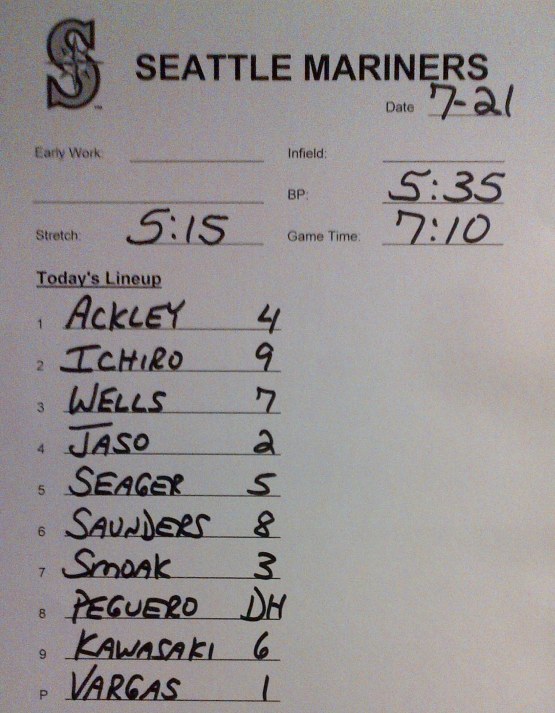
A lineup card that shows the batting order. These are exchanged between the teams before play — just like in cricket.

Once all nine guys have batted, they return to the top of the order, and the first guy bats again. There’s no limit on the number of times you bat – you just go around and around the batting order until the game is over.

If you follow Major League Baseball, you’ll know there’s two Leagues: the American League (which has 14 teams) and the National League (which has 16 teams). Most of the time, teams from each league play only teams from that league. The major exception is the World Series – the final, championship games of the year, where the best team from the AL plays the best team from the NL to be crowned world champion. (There’s also this thing called interleague play, I’ll ignore that for now.)

Anyway, the point I’m getting to is this: the pitcher in an American League team doesn’t bat. So, instead of having nine players on the team, they actually have ten: there’s a guy called the “designated hitter” (or DH) who bats in place of the pitcher. Technically, the DH could bat for any other player, but it’s always the pitcher who doesn’t bat. The DH doesn’t field, he just sits around, and gets probably four or five chances to bat in the game.

In the National League, there’s no DH, and the pitchers bat. Pitchers bat about as well as Murali or Glenn McGrath. There are no all-rounders in baseball.

It’s odd that the two leagues have different rules. You’ll find baseball purists like talking about this. Try expressing a strong opinion on the topic.

As an aside, cricket has played around with a DH-like rule in domestic cricket competitions.

There’s a lot more baseball

Baseball purists are staggered that test cricket matches last for five days. That freaks them out. They’re used to games of baseball that are two or three or (wow, that was a long game) four hours.

I’m more freaked out by baseball: the Major League Baseball season has 162 games per team per year, and that’s not including the postseason (the finals). They play from April to September, and so most teams get maybe three or four days without a game each month. That’s a lot of baseball – there’s pretty much baseball on all day, every day – in fact, there’s 2430 games per season.
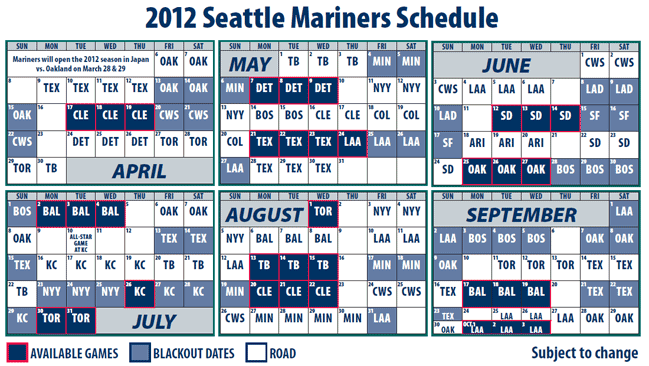
Seattle Mariners 2012 schedule. 162 games, always 81 at home and 81 away.

Because there’s so much baseball, you can get a ticket cheap. Only the Boston Red Sox routinely sell out their stadium. A cheap seat might be $6.

Failure is vastly more common

A few ducks in a row, and you’re probably going to get dropped from your cricket team. Not in baseball. Failure is expected, at least it’s ok for quite a while.

A very good batter in baseball does something useful about 35% of the time. The other 65% of the time, he’s out without doing anything useful – kind of like a duck in cricket. What’s something useful? Well, that could in the extreme be scoring runs – anywhere from one to four (the maximum you can score by hitting a home run when there’s three other guys on the three bases). At the other end, something useful is getting yourself to first base – so that the next guy can help you work on getting around to score a run.

Strangely, something useful can sometimes be getting out – in baseball, the ball isn’t dead when you’re out (unless it’s the third out, in which case the inning is over). If you hit the ball a long way, it’s caught, there’s a guy on second or third base, and he can run around to home, he’ll score a run.

Interestingly, while 35% success is very good, 20% success is very bad. This is a very fine line: succeed 1 in 3 times and you’re amazing, succeed 1 in 4 times and you are ok, and succeed 1 in 5 times and you’re a disaster.

The ball doesn’t bounce

I guess everyone knows the ball isn’t supposed to bounce in baseball. If it does, it’s referred to as a “pitch in the dirt”, which sort of means it was a useless yorker. Since there’s no stumps. there’s no point in trying to sneak the ball under the bat.

The ball not bouncing means that movement off the pitch isn’t a factor in baseball. Instead, baseball is about movement in the air and varying pitch speeds – which you also see in cricket. Movement in the air in baseball is imparted by spin and seams, which in turn is controlled by hand and finger position on the ball. Most good pitchers in baseball have at least three pitches that they throw – a fast ball (they’re pretty much all fast bowlers), and a couple of “off-speed pitches” (slower, deceptive pitches that move around or don’t look slow out of the hand).

Draws don’t happen

There are no draws or tied games. After nine innings, if the score is tied, the game goes into a tenth inning where both teams get a chance to bat. If it’s still tied, it’s time for the eleventh. A ten, eleven, or even twelve inning game is reasonably common. I was at a 15 inning game once, you won’t see that often. The longest professional game went 33 innings.

There’s no overs

Pitchers pitch until their manager decides to take him out of the game and replace him with another pitcher. Baseball has managers who’re in charge of team (rather than a head coach) – they really do make the decisions. You’ll see them come out and visit the pitcher, and let him know he’s done for the game.

A starting pitcher (the guy who starts the game) will typically pitch around 100 pitches, maybe up to 120 if he’s a strong, veteran pitcher. That’s between 17 and 20 overs in a spell! Of course, if he’s getting hit all over the place, anything’s possible – he might last as few as 20 or 30 pitches.

When a starting pitcher is replaced, he’ll typically be replaced with a guy who pitches harder and faster for fewer pitches – a so-called relief pitcher. You might see one to four relief pitchers in a game, depending on how many innings the starting pitcher pitched. Relief pitchers are quirky, and they often have specialty roles. For example, there’s often a guy who’s a left-hander who specializes in throwing at left-handers, and he may throw only one pitch in a game before being replaced (the call these guys LOOGYs, lefty one out guys).

A starting pitcher warms up for quite a while before the game, probably more than you’d typically see a bowler warm up. There’s really no looseners in baseball – pitchers pitch at their top speed from the first pitch. To start each inning, a pitcher gets precisely eight practice throws to their catcher before the first batter steps in to bat.

The catcher is closer

The catcher in baseball fields like a wicketkeeper standing up to a spin bowler. The difference is the pitcher is always a fast bowler, and he’s about 6 feet closer than a bowler in cricket. A typical pitcher throws between 88 and 100 miles per hour (as the ball leaves the hand). Only the fastest fast bowlers have ever hit 100 miles an hour.

The umpire (in black), catcher (in red), and batter (in blue) in close proximity. It’s normal for the umpire to lean on the catcher.

This means that the catcher has to know where the ball is going to go, because he hasn’t sufficient time to react to the pitch. If you watch carefully, you’ll see the catcher tell the pitcher what pitch he should throw before each pitch. He does this by wiggling his fingers between his legs. If the pitcher likes the idea, he’ll nod and pitch. If he doesn’t, he’ll shake his head and the catcher will try another idea. The signals tell the pitcher what kind of pitch to throw (speed and spin), and where to throw it (high or low, in or out).

I’ll share more thoughts on the (subtle?) differences between the games next time.

The size, scale, and numbers of eBay.com

I work in the Marketplaces business at eBay. That’s the part of the company that builds ebay.com, ebay.co.uk, ebay.de, ebay.com.au, and most of the other worldwide marketplaces under the eBay brand. (The other major parts of eBay Inc are PayPal, GSI Commerce, x.commerce, and StubHub.)

I am lucky to have opportunities to speak publicly about eBay, and about the technology we’re building. It’s an exciting time to give a talk – we are in the middle of rewriting our search engine, we’ve improved search substantially, we’re automating our data centers, we’re retooling our user experience development stack, and much more.

At the beginning of most talks, I get the chance to share a few facts about our scale and size. I thought I’d share some with you:

  • We have over 10 petabytes of data stored in our Hadoop and Teradata clusters. Hadoop is primarily used by engineers who use data to build products, and Teradata is primarily used by our finance team to understand our business
  • We have over 300 million items for sale, and over a billion accessible at any time (including, for example, items that are no longer for sale but that are used by customers for price research)
  • We process around 250 million user queries per day (which become many billions of queries behind the scenes – query rewriting implies many calls to search to provide results for a single user query, and many other parts of our system use search for various reasons)
  • We serve over 2 billion pages to customers every day
  • We have over 100 million active users
  • We sold over US$68 billion in merchandize in 2011
  • We make over 75 billion database calls each day (our database tables are denormalized because doing relational joins at our scale is often too slow – and so we precompute and store the results, leading to many more queries that take much less time each)

They’re some pretty large numbers, ones that make our engineering challenges exciting and rewarding to solve.

Any surprises for you?

How are you doing? How to ask for feedback

Listening to feedback can help develop your career. When you know what others think, you can make choices about what and how to improve, and learn and develop competencies that will improve your effectiveness.

Why Get Feedback?

I’d say nine out of ten people have a healthy self-perception. They’re good at things, and they know what they are. They’re bad at things, and they know what they are. The other one in ten fall in two buckets: thinking they’re awesome when they’re not, or thinking they’re terrible when they’re not.

Net, I believe that most people actually know what they’re good at, and what they’re bad at. It’s good to have your list: try writing down your top five strength and weaknesses as you see them. But do they matter? Does anyone realize that weakness? Is it preventing career progress? Are people talking about it? Are you worried about a flaw that no one cares about? Are you great at something that doesn’t matter?

To find out what matters, it’s important to know what others think. You’ll generally need to ask them – good managers will give you feedback at review time, the rest of the time you’ll need to ask. Most other people aren’t going to burst into talking about you. Asking them is a good career move: it shows you’re interested in learning and growing, that you care what others think, and you’re open to feedback. Set up a 1:1 meeting with a few people whose opinions you know you will value, you know can help you create an actionable list, and find out what they think.

Who do I ask?

Who could or should you ask? I’d definitely ask your manager – it’s their job to help you grow, be successful, and have impact. Their opinion also matters – you’re not going to get that key assignment or promotion without their help (there are no exceptions to that rule). I’d ask a couple of peers, and someone who’s junior to you too (which could be someone who reports to you). That’s five people – a good sample. If you want more, try an ex-boss, your boss’s boss (you may find out what the boss says to his boss about you), or someone you admire in another team but that you don’t work with daily.

Receiving Feedback

Never ask for feedback and argue with the giver that they are wrong. It doesn’t matter if they are – you asked for their opinion, which is a subjective view that makes sense in the movie that’s playing in their head. If you argue, you’ll look foolish, you won’t get any more feedback, and you’ve ruined the discussion as a career move. So, listen, write down what they say, say “thanks” frequently, and ask polite inquisitive questions that help you understand their perspective (don’t ask leading questions that show you don’t agree). Basically, don’t talk much.

You may have trouble getting people to be critical of you. It might take a few explicit questions to get them started, and you’ll need to show you’re thankful for the feedback if you want to get more. Try saying things like “I want to have more impact – and I know to do that I’m going to have to learn new skills. What skills do you think I need to develop?” or “If you were me, what’s the number one thing you’d work on changing?” or “What’s the biggest challenge you think I’d face at the next level or in your role?”. Keep your body language positive: no folding your arms, no furrowed brow, no looming over them and pacing around. They’ll be more comfortable in their territory – go to their office if you can. And be very genuine – people can spot a fake from a mile away.

Most of the time, this is going to turn out great. Most people want to help others. And most recipients of feedback know what they’re going to hear – since most recipients do have that healthy self-perception. So, hopefully, you’ll come away with a great list of positives and negatives, and hopefully they’ll be reinforced by the various people you speak to.

One last word of advice: don’t enter into this process lightly. If you ask for feedback, people are going to expect you to do something with it. You’ll score negative points if you ask for feedback and do nothing – people expect you to do something, and they expect to see some signs of life that show you’re making progress.

Next time, I’ll share some thoughts on how to use feedback to create a development plan.

Passwords

Passwords are in the news lately, and particularly associated with ‘leaks’.

In general, passwords are rarely leaked, because they usually aren’t stored. What is usually leaked are the password hashes.

How Passwords Work

When you provide a new password for an account, here’s what typically happens:

  1. The company hashes your password so that it becomes a string of characters that isn’t the password (more in a moment)
  2. The company stores the hash
  3. The company throws away your original password

When you come back to the site, and provide your password, here’s what happens:

  1. You type your password
  2. The password is hashed (using the same algorithm as before)
  3. The hash is compared to what’s stored by the company
  4. If they’re the same, you’re in. If they’re different, your password is wrong, try again

One-Way Hashes

The method that’s used to turn a password into a hash should be one-way. That is, it should be theoretically impossible to reverse the hash into the password. That’s actually pretty easy: most hashing algorithms throw away lots of information, and so the hash is lossy (that is, it has less information in it than the original password — it’s just a very-likely-to-be-unique string that represents the password). So it is actually usually impossible to reverse a password hashing algorithm.

There are many different algorithms for one-way hashing that can’t be reversed. The most popular one-way hash is the 128-bit MD5 hash, though this has been shown to be somewhat insecure (I’ll explain this in a minute). More recent approaches such as SHA-2 are similar in their theory but more secure.

Here’s an example. If you put the string password into an MD5 function, you get 5f4dcc3b5aa765d61d8327deb882cf99 as the output.

How can something that’s lossy be insecure? Since it’s impossible to reverse it, how can it be used by a hacker to find the original password?

The answer is that you can try putting vast numbers of original passwords through the hashing algorithm, and see if you can match the output to what is actually stored. So, for example, you could hash every English word using MD5, and see if you get a string that matches the leaked hashes. If you do, you’re in. And if you find one that matches, chances are you find many more that match too — lots of users have the same password.

That’s the problem with the MD5 hash: computers are sufficiently fast that it’s possible to try very, very large numbers of input strings and compare them to hashes (more later). And so if you’ve got the computing resources, you can effectively “reverse” the hashing.

Salting Passwords

The best way to make it very hard for hackers to figure out the original passwords is to salt them. Salting is a pretty simple idea: instead of hashing the password, hash the password and some other string concatenated to it. That “some other string” is non changing: it could the user’s user ID in the system, the time they created their account, or something else that’s stored but not typically not known to the user.

Here’s an example. Suppose the user supplies the password “magpie”. Instead of hashing this alone, we might append their user ID, say “123456” to the string. So, we’d be hashing “magpie123456” to get our password hash that’s stored in the system.

How does salting help? Well, it makes it hard to reverse the hashing: a hacker won’t be able to match common passwords (say, English words) against the hashes, and so they’ll effectively have to try vastly more input strings. When they crack one, they typically also won’t crack more, since even if the passwords of two users are the same, the salted strings aren’t — “magpie123456” and “magpie123457” produce vastly different hashes.

Of course, if a hacker gains access to the complete database, and the salting algorithm — and so they have all of the input data, and the algorithm for creating the salted strings, you’re in lots of trouble. But if they’ve done that, you’ve got worse things to worry about.

Salting is essential. Don’t build a password system without it. And when you do build the password system, consider a hashing algorithm such as SHA-2. Even the author of MD5 doesn’t recommend using it now — computers have enough resources to brute force crack MD5 using a birthday attack.

I’ll be back next week.

6 secrets for successful small teams

Managing small engineering teams is fun. You’re close to the technology, close to team that’s writing code, and solving problems hands-on. Don’t get me wrong: it’s satisfying, rewarding, and impactful to manage large teams, but there’s nothing like being in the details and seeing a product come together. You lead a small team, by being an example that folks can follow; in contrast, you manage a large team. It’s different.

Here’s six things I’ve learnt along the way about leading small teams. This post was inspired by Greg Brockman’s 6 secrets for building a super team — Greg explained how to hire a small super team, and this is my sequel on how to make it world class.

1. Lead by Example

I’ve seen newly-minted leaders of small teams fail. One of the common reasons is they stop doing what they’re good at: being technical. And when they stop, engineers stop following them. Engineers want their leaders to be driving engineering, working on the hardest problems, and setting an example.

Great leaders of small teams are at least 50% technical, they spend more than half of their time writing code, creating designs, proposing architectures, doing code reviews, solving technical problems, or otherwise getting deep in the details. They know everything that’s going on in their team — they’ve got the right people working on the right problems, they’re driving the people at the right pace, they’ve holding people accountable for doing everything the right way, and they know the teams’ designs and code like they know their own. In the other 50% or less of their time, they’re passionate and focused on process, people, teams, and leadership — they have just the right amount of process to keep the team on track and happy, they’re managing their dependencies, and they’re spending time growing their people and team.

2. Set clear, simple goals, with clear, measurable metrics

You won’t be successful if you don’t know what success is. It’s surprising how many teams build a product without a way of measuring whether they’ve been successful, deciding when they need to be successful, or even without knowing where they’re headed. You should always start with goals and metrics.

Let’s suppose you’re leading the home page team at a major web company. You’re charged with leading a team of seven engineers, who together build all of the components on the page, and deliver everything from the platform pieces through to the pixels. You know who your competitors are, and you’ve got some great ideas on how to build a better home page than they’ve got. You’ve thought about this — you know that owning the home page means you’re the front door to the store, it’s your job to get the customers inside so that they can use all the products and features that the other teams have built.

I’m a fan of having two or three clear goals and objective ways of measuring them. You might decide that success is having the acknowledged leading home page on the web. How might you measure that? Here’s two or three ideas: first, you have lower abandonment than your competitors (lowest percentage of visitors who don’t click anything); second, you win a head-to-head taste test against your competitors at least 2/3rds of the time; and, third, your page is faster to load that your competitor’s. These are all criteria you can measure on a daily or weekly basis, and you can track them and share with the team.

If you want to create drive, fever, and passion in your team, consider setting a Bold Hairy Audacious Goal (BHAG) date. Decide that you’re going to have the best homepage by January 1. Put a graph up on the wall with the months on the x-axis and your objective, measurable success criteria on the y-axis. Every week, update the points for you and your competitors. Huddle the team around the graph, and work together to make success happen. You’ll be surprised how effective this can be in firing up your team, and getting creative ideas into the product.

3. Balance the portfolio

Small successful teams spread their bets. They have many small projects going on, and a couple of large ones. Importantly, the vast majority of the projects are impactful — they’re projects that are pushing the team towards their measurable goals. Good teams avoid doing work that doesn’t matter.

Why are small projects important? Well, first, they mitigate the risk if a large project gets delayed or doesn’t hit paydirt. Second, they give the team a real rhythm: every week there’s something new going out that moves the needle, and the team stays fired up and on track to their goals. Doing only large projects can be a death march — and it’s hard to keep teams fired up on one of those.

4. Meet the team

You have to know your team to be a successful leader. You need to understand the people who work for you, and customize your style to get the most from them. Some folks will need more advice, others will need to be pushed, some will rebel if you push, and some just need to know the goals and be given plenty of space. There’ll always be some conflict brewing, and everyone will have something on their mind that they want you to know — and the only way to find it out is to meet them regularly, really get to know them, build trust, and help them be successful.

I recommend a weekly 1:1 that’s at least 30 minutes, and not focused on the day-to-day. Ask questions in a 1:1, and leave plenty of white space in the conversation for the person you’re meeting to talk to you. Listen to what they say, and ask more questions that explore what they’re saying. Most importantly, be open and honest — say what you think, and it’ll likely work both ways. Conversation is key to being a successful leader.

5. Keep it simple

When the team’s small, you don’t need onerous process, too many meetings, or too much email. I’d recommend a daily stand-up meeting as the basic tool to stay in touch: go around in a circle, and ask each person to say what they did yesterday, what they’re planning on doing today, and anything that’s blocking them from succeeding. Buy some hour glass timers, and make sure everyone stays under two minutes. Don’t allow point-to-point conversation, the meeting is strictly for broadcasting information (the 1:1 or 2:1 conversations can happen after the meeting). Tell the team you will buy them coffee and food if the meeting goes over 20 minutes, and work hard to keep it under 15. Keeping it tight on time and high on information content will ensure you get good attendance and participation.

My hour glass timers. A large one tracks meeting time (20 minutes), and the two smaller ones are for individual speakers (2 minutes each) — one for the current speaker, and one for the next speaker.

When it comes to tracking a project, I recommend simple (and so do most of the people I work with). If it’s six to eight people, you can track projects with sticky notes, a whiteboard, and a camera for recording key information. I’ve also used a simple spreadsheet, where engineers can record the list of tasks that they’re working on and the time they will take, and the sheet automatically burns down the time remaining and computes completion dates. All the engineer has to do is keep the list of tasks in the sheet accurate, and the time estimates up to date, and the rest takes care of itself. In either case, simple is the key — very low overhead for the engineers, and pretty simple for the leader.

6. Keep it small

What I’ve shared applies to teams of 4 to 8 people that work for one leader. Beyond that, the team isn’t small anymore — you’ll find it nearly impossible to be more than 50% technical, and still get in the 1:1s and run an effective team. I’ve met a few people who can do it, but they’re usually super experienced or have super experienced teams.

We’ve all heard the stories of small startups with a few employees doing amazing things (think instagram or pinterest). It’s often because they’re lead by technologists, who’ve set crisp goals, spread their bets, kept it simple, and know their teams well. If you get your small team leadership right, your small team can change the world — and small teams do regularly change the world. Good luck.